
- Inactive Account Manager lets you choose up to 10 people to receive your Google data if your account goes quiet.
- After a death, family can ask Google to close the account, release funds or provide data. Google never gives out passwords.
- Ask for the data first. Once the account is closed, Google can’t hand over its contents.
- An unused personal Google Account may be deleted after 2 years.
One Google Account often covers Gmail, Drive, Google Photos, YouTube and the sign-in on an Android phone. Google offers one planning tool for the owner and one request process for families. This page covers both.
Set it up now
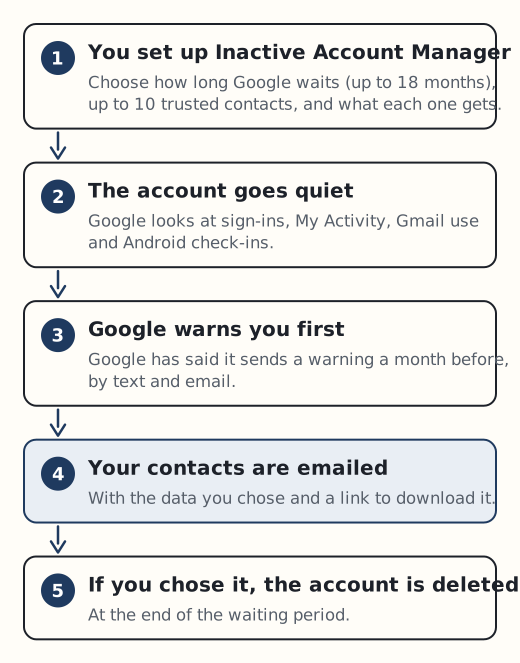
Inactive Account Manager lives at myaccount.google.com/inactive. Setting it up means making three decisions.
- How long Google waits. You tell Google how long your account must be inactive before your plan runs. Google’s 2023 announcement says this can be up to 18 months.
- Who gets what. You can add up to 10 trusted contacts and share different data with each of them. Shareable data includes Mail, Drive, YouTube and Blogger. Google says some information can’t be shared.
- What happens to the account. Google’s 2021 announcement describes a Gmail auto-reply option, and you can choose to have the whole account deleted at the end of the waiting period.
Google decides you’re inactive from signals such as your last sign-ins, your recent activity in My Activity, your Gmail use and Android check-ins. Google has said it warns you a month before the period ends, by text message and email, so you have time to sign in if the warning is a false alarm.
Your contacts are not told when you add them. They get an email only after the waiting period has passed. It lists the data you chose to share and gives a link to download it, with a footer explaining that it was sent on your instructions. If you add a phone number for a contact, Google uses it only to check that the right person is downloading.
A few practical points:
- Tell your contacts they’re on the list, so an email from Google doesn’t come as a surprise or get ignored.
- Ask them to download promptly. Google’s help page doesn’t currently say how long the link stays available.
- If you choose deletion, Google says the Gmail username can’t be reused.
- Don’t rely on this tool for passwords. Google doesn’t say that saved passwords are included, so plan those separately with a password manager that has emergency access.
There is also the phone to think about. If an Android phone is reset and nobody can give the screen lock or the Google Account details, Factory Reset Protection means it can’t be used at all afterwards. Record your phone PIN with your estate papers, or the phone may be unusable to anyone. Our page on where to keep the master password covers safe options.
If someone has died
Google’s official form is called “Submit a request regarding a deceased user’s account”. It offers three options:
- Close the account.
- Request funds from the account.
- Obtain data from the account.
Google says it works with immediate family members and representatives, and that “in certain circumstances” it may provide content. Every request gets a careful review and approval isn’t guaranteed. Google states plainly: “We cannot provide passwords or other login details.”
Ask for the data before you ask for closure. If you close the account first, Google says it is unable to process any later request to turn over its contents.
What a data request needs
The data request form asks for:
- your government ID or driving licence
- a copy of the death certificate
- any other documents that support your request
Documents not in English need a certified, notarised English translation prepared by a professional translator.
There is a bigger hurdle for anyone outside the US. If Google approves the request and Google LLC is the provider, you then need a court order issued in the United States. A UK grant of probate on its own is not enough to get the data.
Google publishes no processing timescale. A solicitor can confirm what obtaining a US order would involve in your situation, and our page on the documents you need covers the paperwork you’ll be collecting anyway.
The two-year deletion clock
A dead person’s Google Account does not stay online for ever. A personal account that hasn’t been used for 2 years may be deleted together with its content, including Gmail, Drive and Google Photos. Google sends warnings first, to the account itself and to any recovery email. Work and school accounts are not covered by this policy.
Some accounts are not deleted for inactivity. They include accounts with an active paid subscription or purchase, a gift card with money on it, or a published app with active subscriptions or payments.
That exception cuts both ways. A paid Google subscription may stop the account being deleted, but it may also keep charging the dead person’s card. Our page on subscriptions and recurring payments explains how to stop that.
If you want the photos or files, start the data request early rather than waiting to see what happens. Google’s process can change, so check the official request form before you apply.
Sources
- Google: Inactive Account Manager help
- Google: Submit a request regarding a deceased user’s account
- Google: Obtain data from a deceased user’s account (form)
- Google: Inactive Google Account policy
- Google blog: Updating our inactive account policies (May 2023)
- Google Security Blog: protecting accounts even when you’re inactive (October 2021)