
- A Legacy Contact can reach most iCloud data after your death using an access key plus a death certificate.
- They don’t get your passwords, passkeys, device passcode or purchased films, music and books.
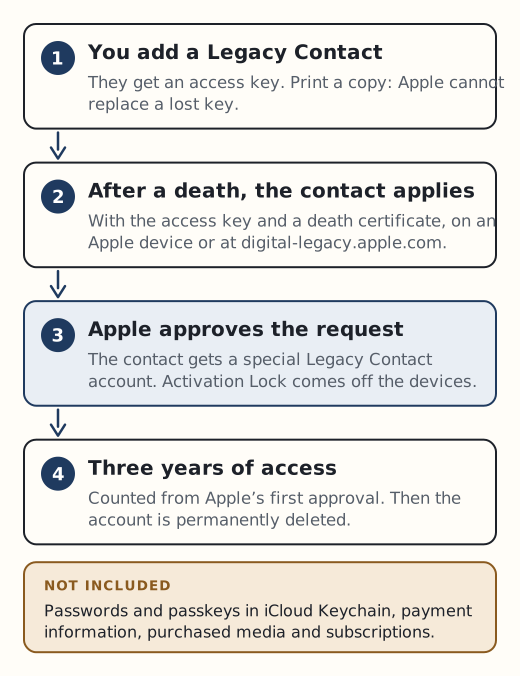
- Access lasts three years from Apple’s first approval. Then the account is permanently deleted.
- Without a Legacy Contact, getting data usually means a court order, and the UK position is unclear.
Apple’s planning tool is called Legacy Contact. It is one of the few real advance-planning features a big platform offers. It also has firm limits, so it helps to know them before you rely on it.
Set it up now
You need two-factor authentication turned on and a device running iOS 15.2, iPadOS 15.2 or macOS Monterey 12.1 or later. On an iPhone, go to Settings > [your name] > Sign-In & Security > Legacy Contact.
Some useful details from Apple’s help pages:
- Your Legacy Contact doesn’t need an Apple Account or an Apple device.
- They must be over 13 (the age varies by country or region).
- You can name more than one. Any one of them can act alone on your account data after your death.
- Each contact gets an access key, an alphanumeric code with a QR code. You can send it by iMessage or choose “Print a Copy” to keep on paper or as a PDF.
- You get an email confirming each contact you add.
- If you remove someone, they aren’t notified and their key stops working.
Treat the access key like a house key. Apple says it can’t access or replace a key that’s been lost or misplaced. A printed copy kept with your will or letter of instruction is a sensible backup to the digital one.
Recovery Contact and Legacy Contact are different things. A Recovery Contact only helps you back into your own account while you’re alive and gets no access to your data. A Legacy Contact is for after your death.
What a Legacy Contact can and can’t reach
| Can access | Can’t access |
|---|---|
| iCloud Photos | Purchased films, music and books |
| Notes, Mail, Contacts, Calendars, Reminders | Subscriptions and in-app purchases |
| Messages in iCloud and call history | Payment and Apple Pay information |
| Files in iCloud Drive | iCloud Keychain: saved passwords, passkeys, card details, Wi-Fi passwords |
| Health data, Voice Memos, Safari bookmarks | The iPhone’s own passcode |
| Anything in an iCloud Backup |
Apple also says some data may be end-to-end encrypted and it can’t decrypt it.
A Legacy Contact does not get your passwords. Keychain is excluded by design, so the people you leave behind still need another route to your other accounts. Our guide to password managers with emergency access covers that part.
If someone has died
If you are the Legacy Contact
You need the access key and a copy of the death certificate. Requirements can vary by country (Apple gives Japan as an example, where a family certificate may be needed). Make the request on an iPhone or iPad under Settings > [your name] > Sign-In & Security > Legacy Contact > Request Access, or at digital-legacy.apple.com.
Once Apple approves, you get a special Legacy Contact Apple Account by email and the original account stops working. Activation Lock is removed from devices that used the original account. You then have three years from the first approval before the account is permanently deleted, so download photos and files well before then.
If there’s no Legacy Contact
Apple will consider two kinds of request.
- Deleting the account. You need your own Apple Account and the legal documentation for your country. Apple says this generally includes a death certificate and might also require a court order or other documents.
- Getting access to the data. In the US, Israel and some other places this needs a court order. Apple lists what it must state, including the deceased’s name and Apple Account, the next of kin requesting access, and that Apple “is ordered by the court to assist in the provision of access”. Some places, such as France, Germany, Japan, Australia and New Zealand, can use alternative documents instead.
The UK is not among the alternative-document countries Apple names, and Apple’s UK page has no UK-specific wording. Don’t assume a grant of probate will be enough. Check with Apple before you spend money on legal steps, and a solicitor can confirm what’s needed in your situation.
Only one person can request access to a deceased person’s Apple Account, so agree within the family who will apply. Apple’s requirements can change, so read its current guidance for families first.
The iPhone itself
Apple can’t remove a passcode without erasing the device. Showing a death certificate won’t unlock the phone. What Apple does do is remove Activation Lock automatically once a Legacy Contact request or deletion request is complete, so the device can be erased and reused. Our page on accessing a deceased person’s phone explains why guessing the passcode is risky.