
- Two-factor authentication can stop your family even if they have your password manager.
- Print backup and recovery codes, and make sure your authenticator app is backed up to an account they can reach.
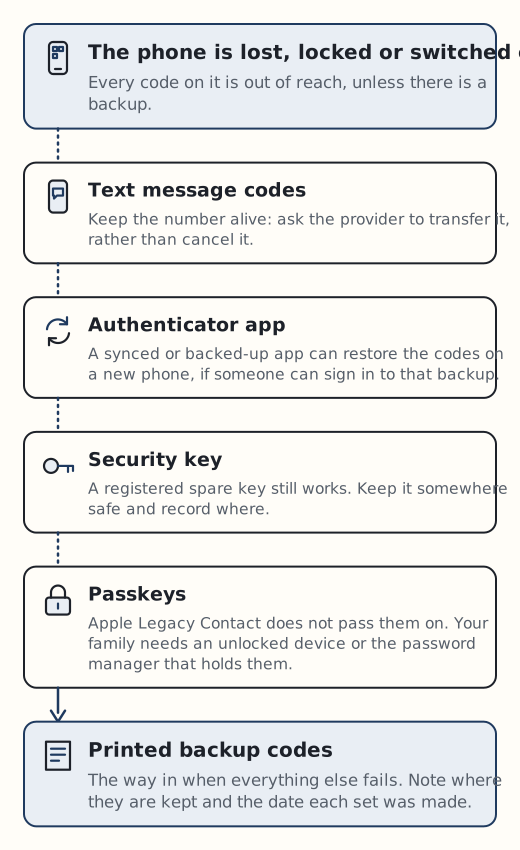
- If you use SMS codes, the phone number matters. Ask your family to transfer it rather than close it.
Two-factor authentication (2FA) adds a second check after your password: a code from an app, a text message, a security key or a passkey. It is good security, but it means a password alone may not get your executor into anything. Plan for the second factor as well as the first.
Backup and recovery codes
Most services give you one-off codes for when your usual second factor is not available. They are the simplest thing to leave behind.
- Google gives sets of 10 eight-digit backup codes, each usable once. You can refresh them for a new set. Google suggests keeping them “where you keep your passport or other important documents”.
- Microsoft gives a recovery code. Making a new one cancels the old one, and you cannot look up an existing code later. Microsoft says to print it and not store it on a device you use to sign in.
- Apple has a 28-character Recovery Key. If you lose it, Apple cannot provide it, and you can be locked out permanently.
Print these, date them so your executor knows which set is current, and keep them with your other access instructions.
Authenticator apps
An authenticator app shows a short code on your phone each time you sign in. What happens to those codes after a death depends on whether the app is backed up.
- Google Authenticator syncs codes to your Google Account when you are signed in. If codes are not synced and the phone is lost, you have to reset 2FA at each site one by one.
- Microsoft Authenticator backs up to a Microsoft personal account on Android, moving to Google One from January 2027. iOS backups cannot be restored on Android. Codes for other services are restored, but for work, school and passwordless Microsoft accounts only the account name is backed up.
- Authy has no export feature. Restoring on a new device needs the backups password, and account recovery takes 24 hours. Twilio, which runs Authy, warns that without backups or the backups password “you will lose your 2FA tokens.”
In practice, your heirs need the phone and its passcode, the account the app syncs to, or each service’s own recovery route.
Text message codes and your phone number
If a service texts you a code, whoever holds your phone number gets that code. So the number itself needs a plan.
In the UK, Ofcom says providers must have policies to treat bereaved customers fairly. They may transfer the account into another person’s name, and you should say if you want to keep the same number. You should not have to pay an early termination charge (business accounts may differ). O2, Vodafone and Three all describe ways to transfer a deceased person’s number.
Closing the contract is the risk. Ofcom has said that number recycling is a commercial decision for providers, and numbers go back into the pool after “anywhere from 3 months up to a year”. After that, codes could reach a stranger.
Ofcom does not tell executors to keep the number, but transferring it keeps codes reachable while accounts are dealt with. Ask for this in your letter of instruction.
O2 warns that once a SIM is closed, contacts, texts and voicemails on it are lost. Ask your family to save them first.
Hardware security keys
A security key is a small USB or NFC device such as a YubiKey. Yubico recommends “1-2 spare keys”, registered at the same time as your main key and kept “somewhere safe but accessible”. A spare stored with your access instructions gives your executor the second factor without your keyring.
Passkeys
Passkeys let you sign in with a key stored on your devices instead of a password and code. The NCSC calls them “as secure or more secure than traditional MFA”. For inheritance, the point is where they live.
Apple passkeys sync through iCloud Keychain, which is end-to-end encrypted, and an Apple Legacy Contact does not get Keychain data. So passkeys are not passed on that way.
If you rely on passkeys, your family needs a way into an unlocked device or the password manager that holds them. No password manager we checked documents how passkeys are handled under emergency access, so do not assume they are included.
What to write down
Keep this with your access instructions, not in your will:
- Which authenticator app you use, and which account it syncs to.
- Where printed backup and recovery codes are kept, and the date each set was made.
- Your mobile number, provider, and a request to transfer rather than cancel it.
- Where any spare security key is kept.
- The passcode for the phone that holds your codes and passkeys.
For where to keep all this safely, see where to keep the master password. If your password manager has emergency access, your contact can reach the vault, but each account inside it may still ask for its own second factor.