
- On Facebook you can choose a legacy contact to look after a memorialised profile, or ask for the account to be deleted after your death.
- A legacy contact can’t log in as you or read your private messages. Meta has said it generally can’t release messages to families.
- Instagram has forms to report a deceased person’s profile, and Meta won’t give anyone the login.
- Some of Meta’s help pages could not be checked for this guide, so confirm the details on Meta’s current help centre.
Meta runs Facebook and Instagram, and its help centre is where the current rules live. Some of those help pages couldn’t be verified directly for this guide. The facts below come from Meta’s own newsroom announcements and the parts of its help pages that could be read. Check Facebook’s help centre before you act, because the detail may have changed.
Set it up now
Facebook: choose a legacy contact or deletion
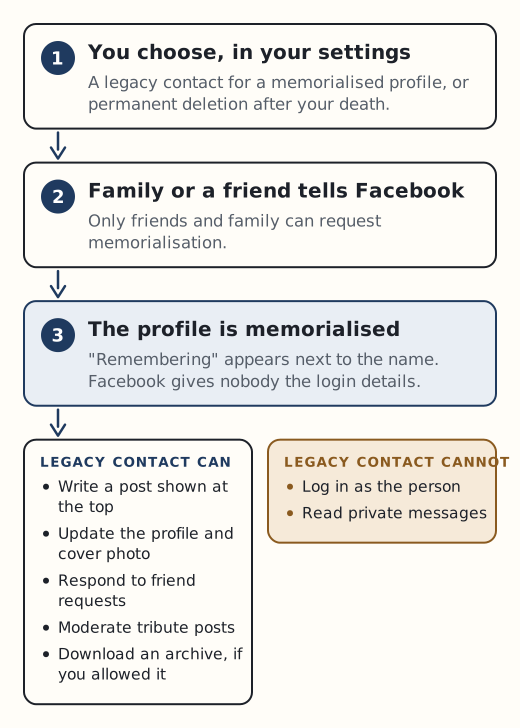
Facebook gives you two choices for what happens after your death, set in your account settings.
- Memorialise the account and name a legacy contact. The profile stays up with “Remembering” next to your name, and your legacy contact can look after it.
- Have the account permanently deleted after your death instead.
According to Meta’s announcements, a legacy contact can:
- write a post to show at the top of the memorialised profile
- respond to new friend requests
- update the profile picture and cover photo
- moderate tribute posts, change who can post and see tributes, and remove tags
- download an archive of your photos, posts and profile information, but only if you allowed it
That last point is a setting you choose. If you want someone to keep a copy of your photos and posts, turn it on when you name them.
A legacy contact can’t log in as you or read your private messages. If there are conversations you’d want someone to have, save them yourself while you can. Put the account and your choice in your digital asset inventory so your family knows what you decided.
We found no legacy contact feature for Instagram. The practical step is to write down in your letter of instruction whether you want the profile kept or removed, and to keep copies of photos you care about somewhere else.
If someone has died
Memorialising a Facebook profile
Only friends and family can request memorialisation. Once a profile is memorialised:
- nobody can log in to it
- the profile stays visible to the same audience as before, and nothing is removed or changed
- a separate Tributes section is added
- Meta says it tries to prevent references to it appearing in ways that may be upsetting
Meta also says it can’t provide login information for a memorialised account. Since 2019 it has used AI to try to keep a person who has died out of prompts such as birthday reminders, even before the profile is memorialised. Parents of a child who died under 18 can ask to become the legacy contact.
Removing a Facebook account
If the person wanted their account deleted, Meta may delete it once next of kin confirm that. Meta has an official form called “Request removal of a deceased family member’s Facebook account”. There is also a form for special requests about a deceased person’s account, and one titled “Requesting Content From a Deceased Person’s Account”. Check each form for the documents Meta currently asks for.
Private messages
Families often hope to read Messenger chats. Meta has said publicly that it generally can’t release the contents of private messages, even in very sad cases. It points to the US Stored Communications Act, which stops it relying on family consent to disclose message contents. A legacy contact can’t see them either.
Don’t try to log in with a password you know or have found. It can breach Meta’s terms, and in the UK unauthorised access to someone’s account can raise issues under the Computer Misuse Act 1990.
Instagram’s help centre summarises its policy like this: “It’s our policy to remove the profile of a deceased person from Instagram.” It also says it is unable to provide anyone with login information to a profile. Instagram has official help pages titled “Report a deceased person’s profile on Instagram” and “About memorialized Instagram profiles”. The proof Instagram asks for, and who can request removal, couldn’t be confirmed for this guide, so read those pages before you apply.
Before you report anything
Download what you can before the account changes. If a legacy contact was given archive permission, they should download it soon. Our guide to closing accounts in order explains where social media fits among everything else, and our page on scams that target bereaved families covers fake donation pages and impersonation that can follow a death on social media.
Sources
- Facebook Help: memorialised accounts
- Facebook Help: Request removal of a deceased family member’s account
- Meta newsroom: Adding a Legacy Contact
- Meta newsroom: Updates to memorialisation (April 2019)
- Meta newsroom: What should happen to our online identity when we die (2017)
- Instagram Help: Report a deceased person’s profile